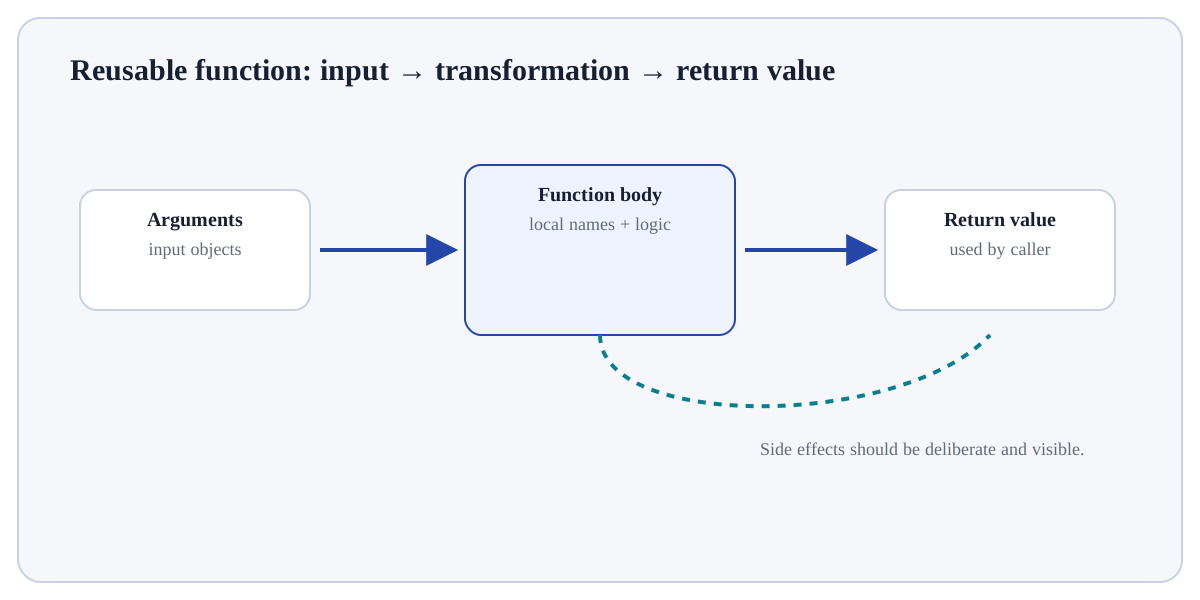
A function definition creates a reusable callable object.
ConceptWorked examplePracticeKnowledge check
Textbook walkthrough
Define and Call a Function
A function definition creates a reusable callable object. def names the function and its parameters; the body executes only when the function is called. Arguments are bound to parameters for that call, and return sends a result back to the caller.
Learning goal: explain why Define and Call a Function behaves this way, apply it to a small example, and verify the result independently. Begin by being able to justify this first step: Define the function with def, a meaningful name and an explicit parameter list.
Deeper walkthrough
Read Define and Call a Function as a mechanism, not a recipe
Treat this as a sequence of observable decisions rather than one opaque command. Stage 1: Define the function with def, a meaningful name and an explicit parameter list. Stage 2: Place the reusable statements in the indented function body. Stage 3: Use return to send the computed result to the caller; without it the function returns None. Final checkpoint: Test at least one normal and one boundary case before reusing the function elsewhere.
Mechanism
Follow the transformation
Define the function with def, a meaningful name and an explicit parameter list.
Place the reusable statements in the indented function body.
Use return to send the computed result to the caller; without it the function returns None.
Evidence
Know what would convince you
Trace a tiny input by hand and compare the runtime result.
Inspect type, value/shape and any mutation/side effect explicitly.
Useful distinctionInput: Objects/values supplied to the operation.
Visual demonstration: use the diagram to trace the main objects and state changes involved in Define and Call a Function.
Click a stage to inspect what happens, what changes, and what should be checked before moving on.
Stage 1
Define the function with def
Define the function with def, a meaningful name and an explicit parameter list. This is an input-preparation stage for Define and Call a Function. Verify the relevant type, shape, units, keys, missingness or assumptions before later steps depend on them.
Input focus: confirm the data/object, units, type, shape and assumptions before the next operation depends on them.
How it works
Trace the mechanism step by step
Define the function with def, a meaningful name and an explicit parameter list.
Place the reusable statements in the indented function body.
Use return to send the computed result to the caller; without it the function returns None.
Call the function with arguments that satisfy the parameter contract and inspect the returned value.
Test at least one normal and one boundary case before reusing the function elsewhere.
Worked demonstration
Define and Call a Function
# Step 1 — Define the reusable `area` function; its indented body describes what happens for each call.
def area(width, height):
    # Step 2 — Return the computed value to the caller so the result can be reused or tested.
    return width * height

# Step 3 — Compute the right-hand expression and store its result in `result` for the next step.
result = area(4, 3)
# Step 4 — Display the current value explicitly so the result/state can be inspected during execution.
print(result)
Expected / illustrative result
Calling area binds width=4 and height=3, executes the body and returns 12.
Interpret the result.
For Define and Call a Function, trace the specific input through the mechanism above and independently verify one returned value, state change or side effect.
Distinctions & related ideas
Place the concept correctly
InputObjects/values supplied to the operation.
StateNames or mutable objects that may change during execution.
OutputReturned value, side effect, file, plot or exception to inspect.
Use deliberately
When it is appropriate
Use Define and Call a Function when it answers a defined question in Functions & Reusable Code and its inputs/assumptions match the current data or program state.
Boundary conditions
When to stop or reconsider
Reconsider Define and Call a Function when the required information is unavailable, the operation would violate a validation/data boundary, or a simpler operation answers the question more transparently.
Common mistakes
Failure modes to recognise
Running the operation on the wrong object/type or in the wrong environment.
Inferring correctness from “no exception” without checking the produced value/state.
Hiding a boundary case instead of making its behaviour explicit.
Verification
How to check the result
Trace a tiny input by hand and compare the runtime result.
Inspect type, value/shape and any mutation/side effect explicitly.
Run an edge or invalid case and confirm the exception/behaviour is deliberate.
Hands-on practice
Demonstrate understanding
Try this:
Construct a tiny example of Define and Call a Function. First define the function with def, a meaningful name and an explicit parameter list. Then place the reusable statements in the indented function body. Predict the result before execution and explain one boundary or failure case.
Use the smallest values that expose the language rule. Write the expected value and type first, then compare the actual state/output with that prediction.
Knowledge check
Check reasoning, not memorisation
Which approach best demonstrates understanding of Define and Call a Function?
Quick reference
Remember the logic
Step 1Define the function with def, a meaningful name and an explicit parameter list.
Step 2Place the reusable statements in the indented function body.
Step 3Use return to send the computed result to the caller; without it the function returns None.
Step 4Call the function with arguments that satisfy the parameter contract and inspect the returned value.
Lesson summary
What to remember
A function definition creates a reusable callable object. def names the function and its parameters; the body executes only when the function is called. Arguments are bound to parameters for that call, and return sends a result back to the caller.
Identify the Python objects and types involved.
Running the operation on the wrong object/type or in the wrong environment.
Trace a tiny input by hand and compare the runtime result.