Getting Started with Python · Lesson 3

The Python Interpreter Scripts and Notebooks

The Python interpreter is the program that reads Python source code and executes it.

ConceptWorked examplePracticeKnowledge check
Textbook walkthrough

What The Python Interpreter Scripts and Notebooks actually means

The Python interpreter is the program that reads Python source code and executes it. You can interact with it directly at a prompt, ask it to execute a saved .py script, or use it as the execution kernel behind a notebook. These are different workflows around the same language and runtime, and the differences matter for output, state and reproducibility.

Beginners often confuse the terminal, the Python prompt, a script and a notebook cell. Understanding the execution model explains why an expression displays automatically in one environment, why a script may print nothing, and why a notebook can produce surprising results when cells are run out of order.

Deeper walkthrough

Read The Python Interpreter Scripts and Notebooks as a mechanism, not a recipe

Treat this as a sequence of observable decisions rather than one opaque command. Stage 1: Interactive interpreter: Python shows a prompt such as >>>, executes one entered statement or expression, and keeps names in memory for the rest of that session. Stage 2: Script mode: the interpreter reads statements from a .py file in program order. Expressions are evaluated, but they are not automatically displayed; use print() or logging when visible output is required. Stage 3: Notebook mode: code is organised into cells that share one kernel state. A later cell can use objects created by an earlier executed cell even when the visible cell order is different. Final checkpoint: Reproducibility check: a notebook should still work after Restart Kernel + Run All; a script should work in a clean environment with its dependencies declared.

Mechanism

Follow the transformation

Interactive interpreter: Python shows a prompt such as >>>, executes one entered statement or expression, and keeps names in memory for the rest of that session.

Script mode: the interpreter reads statements from a .py file in program order. Expressions are evaluated, but they are not automatically displayed; use print() or logging when visible output is required.

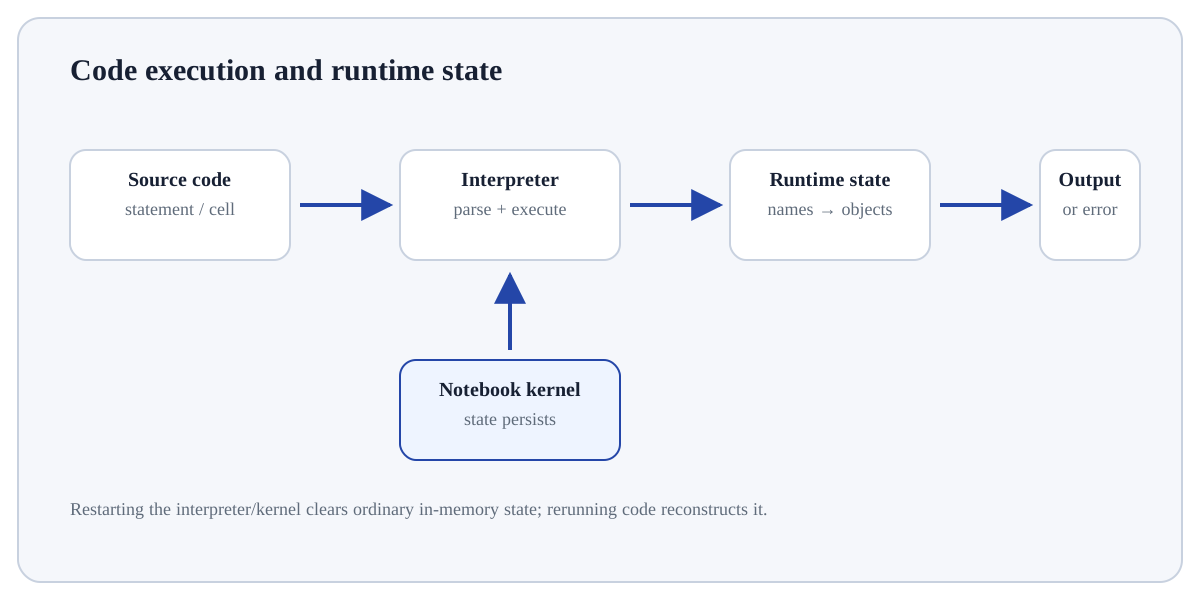
Notebook mode: code is organised into cells that share one kernel state. A later cell can use objects created by an earlier executed cell even when the visible cell order is different.

Evidence

Know what would convince you

Compare the same calculation in three environments. In the interactive interpreter, typing an expression displays its value. In a script, a standalone expression has no visible output. In a notebook, the last expression in a cell is normally displayed, and cell execution order determines the current state.

  • Run the operation on a tiny literal input and write the expected type/value before executing it.
  • Inspect the relevant object state before and after the operation, especially when mutable objects are involved.
Useful distinctionInterpreter: Statement-by-statement; excellent for quick experiments; state lives until the session ends.
Visual demonstration of The Python Interpreter Scripts and Notebooks
Visual demonstration: use the diagram to trace the main objects and state changes involved in The Python Interpreter Scripts and Notebooks.
Click a stage to inspect what happens, what changes, and what should be checked before moving on.
Stage 1

Interactive interpreter

Interactive interpreter: Python shows a prompt such as >>>, executes one entered statement or expression, and keeps names in memory for the rest of that session.

State focus: identify exactly what changed at this stage and what observable evidence confirms that change.
How it works

Trace the mechanism step by step

  1. Interactive interpreter: Python shows a prompt such as >>>, executes one entered statement or expression, and keeps names in memory for the rest of that session.
  2. Script mode: the interpreter reads statements from a .py file in program order. Expressions are evaluated, but they are not automatically displayed; use print() or logging when visible output is required.
  3. Notebook mode: code is organised into cells that share one kernel state. A later cell can use objects created by an earlier executed cell even when the visible cell order is different.
  4. Runtime state: assignments bind names to objects; imports add modules; function/class definitions add reusable objects; restarting the interpreter or kernel clears ordinary in-memory state.
  5. Reproducibility check: a notebook should still work after Restart Kernel + Run All; a script should work in a clean environment with its dependencies declared.
Worked demonstration

Make the concept concrete

Compare the same calculation in three environments. In the interactive interpreter, typing an expression displays its value. In a script, a standalone expression has no visible output. In a notebook, the last expression in a cell is normally displayed, and cell execution order determines the current state.

Demonstration

Python example

# Interactive / notebook example
# Step 1 — Compute the right-hand expression and store its result in `x` for the next step.
x = 10
# Step 2 — Compute the right-hand expression and store its result in `y` for the next step.
y = x * 2
# Step 3 — Execute this statement and inspect how it changes the current value, object or program state.
y

# In a .py script, use print for visible output
# Step 4 — Display the current value explicitly so the result/state can be inspected during execution.
print(y)
Expected / illustrative result
Interactive/notebook last expression: 20
Script with print(y): 20
Interpret the result.

For The Python Interpreter Scripts and Notebooks, connect the displayed result to the specific input and mechanism above; independently verify one value/state change rather than treating successful execution as proof.

Distinctions & related ideas

Know what this is — and what it is not

InterpreterStatement-by-statement; excellent for quick experiments; state lives until the session ends.
Script (.py)Saved program executed from a file; best for repeatable programs, modules and automation.
Notebook (.ipynb)Cells combine explanation, code and rich output; excellent for analysis, but out-of-order execution can create hidden state.
Use deliberately

When it is appropriate

Use The Python Interpreter Scripts and Notebooks when the program genuinely needs this language behaviour and you can state the input object, resulting value/state and expected failure behaviour.

Boundary conditions

When to stop or reconsider

Choose a clearer built-in, data structure or control-flow pattern when it expresses the intent more directly; stop if implicit conversion, mutation or hidden state makes the behaviour hard to reason about.

Common mistakes

Failure modes to recognise

  • Applying the operation to an incompatible type or assuming Python will silently coerce values the way you intended.
  • Confusing a returned value with an in-place mutation or other side effect.
  • Testing only the happy path and missing empty, boundary or invalid inputs.
Verification

How to check the result

  • Run the operation on a tiny literal input and write the expected type/value before executing it.
  • Inspect the relevant object state before and after the operation, especially when mutable objects are involved.
  • Try one boundary or invalid input and confirm that the returned value or exception matches the intended contract.
Hands-on practice

Demonstrate understanding

Try this:

Build a tiny, inspectable example of The Python Interpreter Scripts and Notebooks. First interactive interpreter: Python shows a prompt such as >>>, executes one entered statement or expression, and keeps names in memory for the rest of that session. Then script mode: the interpreter reads statements from a .py file in program order. Expressions are evaluated, but they are not automatically displayed; use print() or logging when visible output is required. Write the expected result before running it, and explain one condition that would make the result misleading or invalid.

Use the smallest values that expose the rule. Write the expected value and type first, then compare Python’s actual state/output with that prediction.
Knowledge check

Check reasoning, not memorisation

Before trusting a result from The Python Interpreter Scripts and Notebooks, which check provides the strongest evidence that you understand and applied it correctly?

Quick reference

Keep the important distinctions visible

Step 1Interactive interpreter: Python shows a prompt such as >>>, executes one entered statement or expression, and keeps names in memory for the rest of that session.
Step 2Script mode: the interpreter reads statements from a .py file in program order. Expressions are evaluated, but they are not automatically displayed; use print() or logging when visible output is required.
Step 3Notebook mode: code is organised into cells that share one kernel state. A later cell can use objects created by an earlier executed cell even when the visible cell order is different.
Step 4Runtime state: assignments bind names to objects; imports add modules; function/class definitions add reusable objects; restarting the interpreter or kernel clears ordinary in-memory state.
Lesson summary

What to remember

  • The Python interpreter is the program that reads Python source code and executes it. You can interact with it directly at a prompt, ask it to execute a saved .py script, or use it as the execution kernel behind a notebook. These are different workflows around the same language and runtime, and the differences matter for output, state and reproducibility.
  • Interactive interpreter: Python shows a prompt such as >>>, executes one entered statement or expression, and keeps names in memory for the rest of that session.
  • Applying the operation to an incompatible type or assuming Python will silently coerce values the way you intended.
  • Run the operation on a tiny literal input and write the expected type/value before executing it.